
5 ѕιмρℓє ωαуѕ тσ ιη¢яєαѕє уσυя ιηтєℓℓιgєη¢є


Your brain needs exercise just like a muscle. If you use it often and in the right ways, you will become a more skilled thinker and increase your ability to focus. But if you never use your brain, or abuse it with harmful chemicals, your ability to think and learn will deteriorate.

Here are 5 simple ways anyone can squeeze a bit more productivity out of the old gray matter.


1. Minimize Television Watching - This is a hard sell. People love vegetating in front of the television, myself included more often than I’d like. The problem is watching television doesn’t use your mental capacity OR allow it to recharge. It’s like having the energy sapped out of a muscle without the health benefits of exercise.

Don’t you feel drained after a couple hours of TV? Your eyes are sore and tired from being focused on the light box for so long. You don’t even have the energy to read a book.

When you feel like relaxing, try reading a book instead. If you’re too tired, listen to some music. When you’re with your friends or family, leave the tube off and have a conversation. All of these things use your mind more than television and allow you to relax
2. Exercise - I used to think that I’d learn more by not exercising and using the time to read a book instead. But I realized that time spent exercising always leads to greater learning because it improves productivity during the time afterwards. Using your body clears your head and creates a wave of energy. Afterwards, you feel invigorated and can concentrate more easily.

3. Read Challenging Books - Many people like to read popular suspense fiction, but generally these books aren’t mentally stimulating. If you want to improve your thinking and writing ability you should read books that make you focus. Reading a classic novel can change your view of the world and will make you think in more precise, elegant English. Don’t be afraid to look up a word if you don’t know it, and don’t be afraid of dense passages. Take your time, re-read when necessary, and you’ll soon grow accustomed to the author’s style.

Once you get used to reading challenging books, I think you’ll find that you aren’t tempted to go back to page-turners. The challenge of learning new ideas is far more exciting than any tacky suspense-thriller.
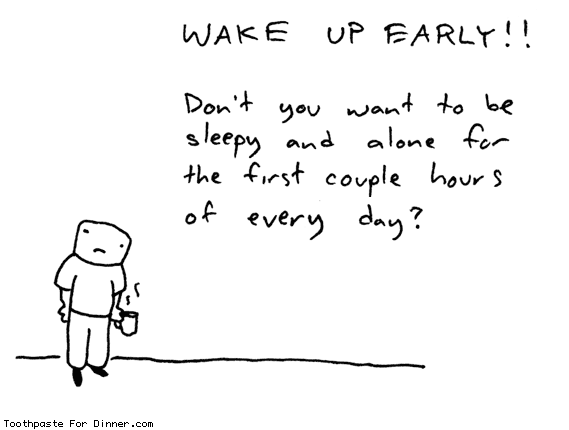

4. Early to Bed, Early to Rise - Nothing makes it harder to concentrate than sleep deprivation. You’ll be most rejuvenated if you go to bed early and don’t sleep more than 8 hours. If you stay up late and compensate by sleeping late, you’ll wake up lethargic and have trouble focusing. In my experience the early morning hours are the most tranquil and productive. Waking up early gives you more productive hours and maximizes your mental acuity all day.

If you have the opportunity, take 10-20 minute naps when you are hit with a wave of drowsiness. Anything longer will make you lethargic, but a short nap will refresh you.


5. Take Time to Reflect - Often our lives get so hectic that we become overwhelmed without even realizing it. It becomes difficult to concentrate because nagging thoughts keep interrupting. Spending some time alone in reflection gives you a chance organize your thoughts and prioritize your responsibilities. Afterwards, you’ll have a better understanding of what’s important and what isn’t. The unimportant stuff won’t bother you anymore and your mind will feel less encumbered.

I’m not saying you need to sit on the floor cross-legged and chant ‘ommm’. Anything that allows a bit of prolonged solitude will do. One of my personal favorites is taking a solitary walk. Someone famous said, “All the best ideas occur while walking.” I think he was on to something. Experiment to find the activity that works best for you.

source->www.pickthebrain.com

ωнαт ιѕ ѕραм?


Spam is flooding the Internet with many copies of the same message, in an attempt to force the message on people who would not otherwise choose to receive it. Most spam is commercial advertising, often for dubious products, get-rich-quick schemes, or quasi-legal services. Spam costs the sender very little to send -- most of the costs are paid for by the recipient or the carriers rather than by the sender.

There are two main types of spam, and they have different effects on Internet users. Cancellable Usenet spam is a single message sent to 20 or more Usenet newsgroups. (Through long experience, Usenet users have found that any message posted to so many newsgroups is often not relevant to most or all of them.) Usenet spam is aimed at "lurkers", people who read newsgroups but rarely or never post and give their address away. Usenet spam robs users of the utility of the newsgroups by overwhelming them with a barrage of advertising or other irrelevant posts. Furthermore, Usenet spam subverts the ability of system administrators and owners to manage the topics they accept on their systems.

Email spam targets individual users with direct mail messages. Email spam lists are often created by scanning Usenet postings, stealing Internet mailing lists, or searching the Web for addresses. Email spams typically cost users money out-of-pocket to receive. Many people - anyone with measured phone service - read or receive their mail while the meter is running, so to speak. Spam costs them additional money. On top of that, it costs money for ISPs and online services to transmit spam, and these costs are transmitted directly to subscribers.

One particularly nasty variant of email spam is sending spam to mailing lists (public or private email discussion forums.) Because many mailing lists limit activity to their subscribers, spammers will use automated tools to subscribe to as many mailing lists as possible, so that they can grab the lists of addresses, or use the mailing list as a direct target for their attacks.

нσω тσ ¢αρтυяє ѕ¢яєєη


This is a simple trick to capture your screen shot.

This page shows you how to capture a screen shot of your desktop or a window. Although the print screen feature has been available on Windows machine for a long time, some people have never tried to use it and would want to find out how.


To capture a screen shot of your entire desktop:


  1. Hit "Print Screen" key on your keyboard (or "Print Scrn", or similar).
  2. Open an image editor (i.e. Photoshop, Paintshop, or the Windows built-in "Paint").
  3. Press Ctrl-V to paste the image and save the file as Jpeg, Bitmap, etc..

To capture a screen shot of only a window, a popup, or an error dialog:

  1. Make sure the window or popup which you want to capture is active (on the very front of your screen).
  2. Hold the "Alt" button and press "Print Screen" key on your keyboard (or "Print Scrn", or similar).
  3. Open an image editor and press Ctrl-V to paste the image and save the file as Jpeg, Bitmap, etc..

5 Reasons Why You Might Want To Switch From XP To Windows 7


window xp an excellent operating system. The majority of Windows users are still running Windows XP followed by window vista and other variants. XP is leading the field by a ratio of 3:1 according to statistics gathered on w3school (the operating system gets transmitted usually when a user opens a website). That alone is reason enough to define Windows Vista as a failure; Or Windows XP excellent and Windows Vista not convincing enough for the majority of Windows users to make the switch. Enter Windows 7. Windows 7 will be released this year. The last information suggest a release in October 09. Windows XP users once again have to make the decision if they want to make the switch or stick with their operating system.

The following paragraphs list five reasons why Windows XP users might want to make the switch to Windows 7. To be perfectly clear: It is without doubt possible to use Windows XP as the main operating system in the coming five or ten years. A friend of mine was still running Windows 98 when Windows Vista came out. The main question however is if the majority will make the switch. Will Microsoft’s new operating system Windows 7 convince users to make the switch?

1. Security

The introduction of UAC and several other security components in Windows Vista was probably one of the most annoying experiences for users who switched from XP to Vista. While it did increase the security of the computer system it annoyed users to now end to see UAC prompts all the time. Windows 7 will still use UAC but with a reduced number of user prompts. A convincing reason why UAC is good are the monthly security patches and classifications that Microsoft releases. Many vulnerabilities are classified as critical for Windows XP systems but only as important on Vista systems.

It is quite possible to pimp Windows XP with third party application reach the same, or even a better level of security, than Windows 7 will provide out of the box but installing those solutions is usually left to computer geeks and those with the know how to do so. The average user installs a security software and that’s usually it. Microsoft will supply Windows XP users with security patches until 2014 with a likely scenario that support gets extended a few years after that.


2. Hardware Compatibility

There are not many differences in hardware support between Windows XP and Windows Vista. The only notable difference that might affect users in the future is the support of Direct X 10 in Windows Vista while Windows XP users have only access to Direct X 9. While this is not a huge problem at the time being thanks to both game devolpers and hardware manufacturers it could become a issue in the coming years.

Direct X 10 compatible hardware was scarce when Direct X 10 came out. Even scarcer were the games that supported the new standard. This was largely because game developers did not want to spend resources in both Direct X 9 and 10 development and because video cards that were able to deliver good framerates were practically not available. Windows 7 will ship with Direct X 11 which again will not be available for Windows XP users. It is likely that the release of Windows 7 will see a critical mass shifting to Direct X 10 and 11 compatible gaming which might leave Windows XP gamers behind. They probably can play the games but will face a different game experience.

Other new hardware standards and devices might not work with Windows XP in the future. Hardware developers will eventually stop producing drivers for Windows XP. While this surely will not happen in the next two years it is likely that this is going to happen eventually.


3. Design

windows 7 wallpaper

Many users don’t like the default themes and designs of Windows XP. Microsoft did not exactly deliver a great variety of themes and customizability options in Windows XP. A handful of official themes deliver over the period of years is nothing that they should brag about. The users once again created a thriving scene of theme developers and operating system modifiers. This again was something for the hardcore users who knew how to patch system files to use different themes and such.

Windows 7 will come with a never seen before customizability. It will ship with regional themes, dozens of wallpapers, sound schemes and other interface elements. Users can create their own themes easily and even save the themes to share it with friends and the global community.

The Windows 7 design looks more eye pleasing and 21st century like than that of Windows XP. At least for most users who are asked the question.


4. Speed and Performance

Windows 7 will beat Windows XP performance wise. It will boot faster, use less system resources like cpu and computer memory while running and add better performance for SSD devices which will become a huge part of the storage device market in the coming years. It beats Windows XP (and Windows Vista if that matters) fair and square in all performance related benchmarks.


5. New And Overhauled Features

Windows 7 adds several new features to the table. Some are not really aimed at a mass market like the multi-touch support, biometric devices or handwriting recognition. Several key elements have been overhauled, most notably probably the Windows taskbar which integrates many interesting new features. Many of the features that have been added make Windows 7 more attractive. Think of included system codecs to play divx movies or DVDs without the need for third party applications.

Log in to Yahoo! Messenger with multi account within the same time


I have good news for those who like chatting by using Yahoo! Messenger. We usually have more than one account (including Kang Rohman). In default, if we log in to Yahoo! Messenger on our computer, we cannot log in again with another account. If we try to log in with another account, automatically, the previously logged-in-account will be logged out, in other words, we can only log in with one account.Is there a way to be able to log in with multi account within the same time? Well, actually there is the way to log in with multiple accounts in the same time. Want to know? Below are the steps (for Windows XP)

Is there a way to be able to log in with multi account within the same time? Well, actually there is the way to log in with multiple accounts in the same time. Want to know? Below are the steps (for Windows XP)

  1. Click Start on your computer
  2. Click Run…
  3. Write : regedit
  4. Click OK
  5. When window registry editor open, find HKEY_CURRENT_USER
  6. Open this: HKEY_CURRENT_USER Software Yahoo ⇒ Pager Test.
  7. Right click at the folder Test ⇒ New ⇒ DWORD Value

    DWORD

  8. Rename the New Value #1 becomes : Plural
  9. Right click at Plural Modify

    modify

  10. Change Value Data becomes 1, Base choose at decimal. Click OK

    plural

  11. Close your Window Registry editor

  12. Done

Hide your IP with Proxy Browsing for FREE

Using a proxy is a great way not to reveal your identity to the website you are accessing. Now there could be tons of reasons why you might want to use proxy but here are some VALID reasons

  • IF you don't want the website collecting your IP address/ location for example like Google records details of your search including what you search and your IP address.
  • If the website had limits imposed based on IP address for example file downloading sites Rapidshare.de have bandwidth limits on IP address and region by a Proxy you can have multiple IP address and region give you unlimited download from Rapidshare, megashare etc.
  • If your IP address is a victim of mass IP ban, many websites ban IP address in block or range and some ip address becomes a casualty of reckless banning.
  • If you want to use multiple account at the same time if the website is IP based logim. Most sophisticated websites are IP based login that means even if you change the browser your login id remains the same !


Here comes the Whipped Cream, There are many online options most of them really irritating with tons of ads and zillion pop-up and some and the goods ones are obviously PAID, Now I like the four letter word FREE (I am sure you do too) so here is the only FREE proxy Software that is of any good is proxyway.

Thanks to proxy I am been told that I am from Spain, USA, China & Brazil in the space of few hours !


You can download proxyway from here, installation is pretty much like any software. Once Installed click on proxy (Retro Desktop icon) then click on the Proxyway Auto configuration button. Choose the browser you want to install the Proxy and 10-30 min later you are done !!

WE SUGGEST: you use the browser you normally don't use ofter for example I installed it on Internet explorer as I use Firfox virtually all the time ! By doing this you can use your own default setting most of the time since using a proxy is a major drag !

Now here the not so good part using a proxy

The speed sucks ! reminds you of the 28 Kbs days when you could make and eat 7 course meal before a page could be downloaded !
But hey its FREE and the website thinks you are from Sao Paulo Brazil ... what more can you ask !

You session is broken many times ! cuz depending on the proxy available the settings keep changing you might have started writing that mail in Spain and when you click send you might be in Warsaw, Poland so you are going to get sweet little error message !

Hey almost forgot here is the screen shot:


Before some weird concoction is brewed, if you thought just by changing the IP address you can anything you want and get away...guess what there are other ways to hunt you down if you did something wrong!

Setting Domain Blogspot With co.cc Domain

co.cc is a free domain. It's not only URL forwarding but we can setup DNS Records, A, MX, and CNAME records. We can change our blog's name to become "name.co.cc". It's more simple than we use domain "name.blogspot.com". To change our default blogspot name to co.cc domain name there are some steps to do. Here is the tutorial to setup domain co.cc


1. Open your browser to co.cc
2. Then regiter a domain that you want to use.
3. If it's no available you have to find another domain name. But if it's available then you can register it.
4. The you have to setup your domain. Got to "setup-->Manage domain"
5. Choose "Zone Records"
6. In the coloumn "Host" fill it with your domain name (www.yourdomainname.co.cc")
7. Choose "CNAME" for "Type"
8. In the "Value" box fill it with "ghs.google.com"
9. Then click "Setup" Button.


The next step is make some setup in blogspot.

1. Login to Bloggr/blogspot then choose "Setting-->Publishing"
2. Then choose "Switch to: • Custom Domain
3. Then click on "Already own a domain? Switch to advanced settings"
4. Fill it with your new domain in the "Your Domain" coloumn.


5. To Finish click "Save Setting" Button.

It will take 1-48 hours for your new domain to work. So be patient....